
Rob Moretti
@robmoretti · TikTok
“Chat Video Pro is blowing my mind!”
Cut the story. Create the shot. Create captions. Finish the sound.
Cut the story. Create the shot. Create captions. Finish the sound. All inside Premiere Pro.
Workflow router
CHOOSE YOUR ACCESS
Creator Bundle
$199.99 one-time
Full panel and Audio Expansion. Yours forever.
Creator Pass
$24.99/mo
Full panel and Audio Expansion while active.
Both options include the full panel and Audio Expansion. Provider usage is extra.
Chat Video Pro is blowing my mind!

Rob Moretti
@robmoretti
TikTok
It's incredible that they've managed to bring such a comprehensive and useful plugin to Premiere that combines so many tools, and there are more and more features being added all the time.

Stefan Stöger
Full Videoproduction Service · Stoeger Film e.U.
I've become a content machine leveraging on storycutter. I now repurpose content faster for my clients.

Lucky Ozero
Video Editor/Motion Designer · Lavish Motions Studio
This is the plug-in editors have been waiting for.

Th3Shooter
th3shooter.edits
Story cutter within Chat Video Pro is saving me time by getting the scripts fully dialed in within the working file in premiere pro.

Mike
CEO / CCO · Made Good
You see how we just edited ten videos for 72 cents? That is so much cheaper, faster, and more effective — even compared to hiring overseas help.

Jay Pierluissi-Espitia
High Ticket Creative · Video Business Coach
Editing just changed forever… and most people don’t even know it yet.

Tobimarad
@tobimarad
What I appreciate most isn't just the software—it's the way you genuinely listen to your users and continue improving it.

Flow Animat Motion
Editor · animatmotion
The Editorial Intelligence
Cut your dialogue instantly. Let the transcript build your timeline.
Built for interviews, podcasts and talking heads.
Transcript to rough cut
Build a first cut from the dialogue already on your timeline.
Selects, batches & social clips
Find the hook. Cut a series. Pull a vertical clip.
Match your script
Turn your written script into a word-for-word dialogue edit.
Transcribe in 99+ languages
Use Story Scribe or bring a Premiere transcript.
The world’s best models


The Production Studio
Cinematic B-roll, visual fixes and animated captions — all inside Premiere Pro.
Click a workflow to watch it in action ↑
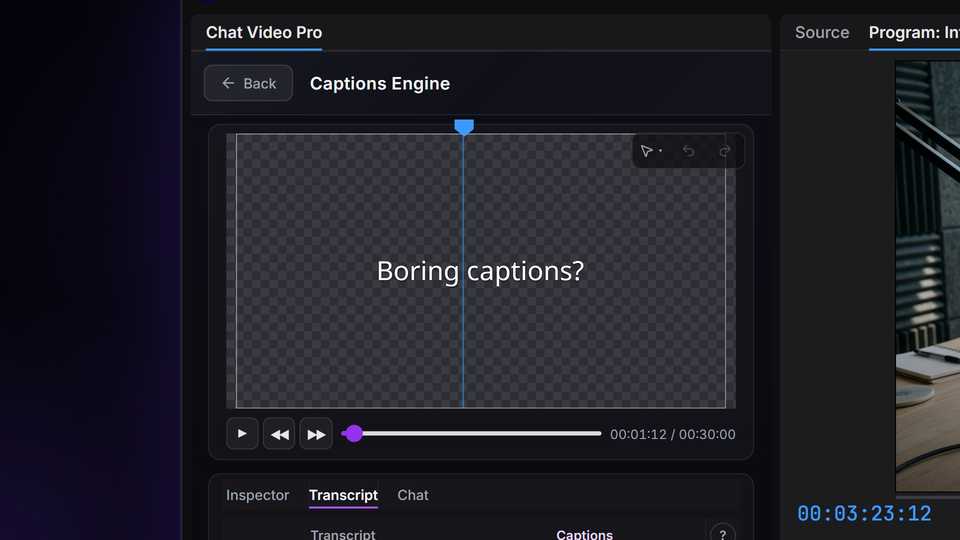
Captions Engine
Your transcript. Your style. Animated captions straight to your Premiere timeline.
Included with every CVP plan. Optional AI enhancement, chat and cloud transcription incur provider usage charges.
From the edit suite
“I've become a content machine leveraging on storycutter. I now repurpose content faster for my clients.”
Lucky Ozero
Video Editor/Motion Designer · Lavish Motions Studio
“Chat Video Pro is blowing my mind!”
Rob Moretti
@robmoretti · TikTok
“It's incredible that they've managed to bring such a comprehensive and useful plugin to Premiere that combines so many tools, and there are more and more features being added all the time.”
Stefan Stöger
Full Videoproduction Service · Stoeger Film e.U.
Real customers on camera. Founder marked.
Audio Expansion
The missing voice, the right hit, an original score. Make it in the same Premiere panel.
Paid expansion. Included permanently in Creator Bundle, or with Creator Pass while active.
The Model Layer









Keep the edit in Premiere
A capable MCP bridge can let ChatGPT read and edit your sequence. Chat Video Pro gives you editorial, captions, generation and audio workflows with controls built for video editors.
ChatGPT connected through MCP
The connected-assistant approach
Optional specialist-tool example
Example monthly total
$64–$131/mo
4 tools · month-to-month USD
MCP does not require this stack. Illustrative stack. Plans overlap and include different usage allowances; this is not an equal-usage cost comparison.
Inside Adobe® Premiere Pro®
One workspace
What you get
The specialist-tool example is not a required cost of using MCP. Some tools offer Premiere plugins, including Runway. Compare the capabilities of your current setup with the workflows you need.
The real difference
Connected assistant
Bridge-defined tools
vs
Chat Video Pro
Editor workflow controls
Use dedicated interfaces for the work in your edit
Connected assistant
Integration-specific captions
vs
Chat Video Pro
Reusable caption styles
Pick a look; update changed sections
Connected assistant
Your connected services
vs
Chat Video Pro
Cut. Create. Caption. Finish.
Core panel + Audio Expansion, in one workspace
Choose the access that fits how you edit. See pricing →See pricing →
Wholesale AI billing
You pay Chat Video Pro for panel access, and pay for AI through your connected provider account at provider rates, with no CVP markup. Own your tools or subscribe monthly; AI usage is separate.
Specialist tools
Chat Video Pro
Transcript rough cuts
Images, video + upscaling
Animated captions
Voiceover + voice cloning
Music + sound effects
Stem separation
Example monthly stack
$64–$131/mo
Illustrative stack. Plans overlap and include different usage allowances; this is not an equal-usage cost comparison. Stem separation is not included in this total.
USD, billed monthly, before tax. Entry through creator/pro plans; annual discounts and introductory offers excluded. Checked .
Creator Bundle and an active Creator Pass include Audio Expansion. Base and Teams include Story Cutter, Studio and Captions Engine; Audio Expansion is separate.
Choose your access. Pay providers for AI.
Creator Pass
$24.99/mo
Core panel + Audio Expansion while active
Creator Bundle
$199.99
One-time · core panel + Audio Expansion owned permanently
Both options include the panel and Audio Expansion. Provider usage is separate.
Read the detailed comparisons: Descript · Runway · ElevenLabs · All comparisons →
The Tutorial Hub
Quick-start tutorials direct from the team — no fluff, just the panel in action.
Swipe →

Story Cutter

Motion Graphics

Sound Design

VFX

Workflows

VFX
Need a step-by-step reference? Browse the full documentation →
Frequently Asked
Yes. Chat Video Pro runs as a panel inside Adobe Premiere Pro on both macOS (Intel and Apple Silicon) and Windows 10/11. Adobe Premiere Pro 2026 (v26.x) only. Earlier versions are not officially supported or guaranteed to work.
You stay in control. Story Cutter is fully non-destructive — it places a rough cut on your timeline that you refine like any edit, and nothing is baked in or round-tripped as XML. You can generate multiple versions of a cut and pick the best, or adjust the brief and re-run.
Setup is about 60 seconds — add one API key and you’re running. You prompt in plain language, so most editors get their first AI rough cut or generation within minutes, not days.
Your license is a one-time purchase installed locally in Premiere, and your Fal.ai key and billing are your own. Your Fal.ai key is stored on your machine, and when you use an AI feature your prompts and media go straight from your computer to your own Fal.ai account, not to us. You keep the version you have, and AI generation continues to run directly through your own Fal.ai account.
No subscription required. No credit markup. No hidden fees.
The core offer is a one-time lifetime license — pay once, own the panel forever. AI generations bill straight to your own Fal.ai account at Fal’s published wholesale rates. No reseller markup, no credit system, no middleman.
Creator Pass is optional: the same full panel on a monthly plan ($24.99/mo for one seat, $49.99/mo for two) if you prefer lower upfront cost. Cancel anytime from your Lemon Squeezy account.
You only pay Fal for what you generate — most creators spend just a few dollars a month. That wholesale model is the moat: competitors lock you into subscriptions and resell AI at a markup.
Lifetime tiers (Base, Creator Bundle, Teams) are one-time purchases. You own the license permanently and get 7-day money-back on the license fee.
Creator Pass is the same full panel on a monthly plan — lower upfront cost, cancel anytime. It also unlocks every panel expansion, including the Audio Expansion, while the pass is active. The downloadable Expansion Kit (folder template, export presets, LUTs) is a separate purchase on any plan. Teams lifetime includes two seats; Creator Pass 2-seat is $49.99/mo.
Yes. Cancel Creator Pass whenever you want, then buy a lifetime tier at checkout.chatvideopro.com. Your project files stay on your machine and your Fal.ai account stays your own — you are upgrading the license, not starting over.
Open the Lemon Squeezy customer portal from the "Manage your subscription" link in your receipt email. There you can update your card, cancel, or view invoices. Access continues through the end of the paid period after you cancel.
Can’t find the link? Email chatvideopro@gmail.com with the address you used at checkout and we will point you to the right portal.
No — Creator Pass does not include a free trial, and it is not covered by the money-back guarantee. It is the low-commitment way to try the full panel: $24.99/mo billed monthly, cancel anytime from the Lemon Squeezy portal, and no further renewals after you cancel. If you want a guarantee instead, the lifetime licenses come with a 7-day money-back guarantee.
Browser AI tools are great, but they require you to export your footage, upload it, generate content, download results, and reimport — all while leaving Premiere. Chat Video Pro runs inside Premiere as a CEP panel, so prompts execute directly on your timeline.
Story Cutter reads your active sequence’s transcript to create rough cuts without any file export. Studio tools generate video or images and drop them directly onto your sequence. You also pay wholesale Fal.ai pricing (typically ~$10/month) instead of multiple separate subscriptions.
Depends on the model. Typical ranges:
Most creators spend less per month than a single subscription app.
Yes. Every one-time Chat Video Pro software licence is fully refundable within 7 calendar days of purchase — Base, the Creator Bundle, Teams and the Audio Expansion. Refunds are processed through Lemon Squeezy.
Two things sit outside that guarantee. The Expansion Kit downloads are final sale once downloaded, because you keep the files. And AI provider usage you have already spent is billed by the provider, not by us, so there is nothing on our side to refund.
Creator Pass is also outside the guarantee: subscription payments are not refundable. It is billed monthly at a low price precisely so you can try the full panel without a large commitment, and cancelling from the Lemon Squeezy portal stops any future renewal. The 7-day money-back guarantee applies to the lifetime licenses.
We offer three options:
You can upgrade to the Creator Bundle anytime, or add the Audio Expansion to Base or Teams later.
You need Chat Video Pro. The Audio Expansion is a paid expansion for the Premiere Pro panel — it unlocks inside a panel you already own. There is no separate app, and buying it on its own leaves you with nothing to run it in.
Already own Base or Teams? Buy the expansion and the four audio workflows light up in the panel you have. Do not own Chat Video Pro at all? Take the Creator Bundle ($199.99) instead — that is the base panel and the full Audio Expansion in a single purchase. Full workflow tour: https://www.chatvideopro.com/audio-expansion/
It depends on when you bought it. Creator Bundles purchased from the Audio Expansion launch onward are Base plus the full Audio Expansion, so there is nothing more for you to buy.
Bundles bought before the launch were a different package: Base plus the downloadable asset kit — project folder template, export presets and LUTs — which is now sold on its own as the Expansion Kit. If that is what landed in your inbox, your bundle does not include the audio workflows.
You are not paying full price either way. During the launch window every buyer gets the launch price. After it closes, your standing 20% owner discount (code CREATOR20) becomes the best price on the Audio Expansion.
Yes, for as long as the pass is active. Creator Pass ($24.99/mo per seat) unlocks every panel expansion, the Audio Expansion included — there is no separate audio price for pass holders and nothing extra to activate.
Two things worth knowing. The unlock lasts while the subscription runs, so it stops with the pass — unlike a one-time expansion licence, which is yours permanently. And the perk covers panel expansions, not the downloadable Expansion Kit, which stays a separate purchase on every plan.
No. They are two unrelated add-ons that happen to sit side by side on this page, and buying one gives you nothing from the other.
If you want AI voiceover, sound effects, score or stems, the Audio Expansion is the one you want. The Expansion Kit is a project-setup and grading kit.
Neither is charged by us. The Audio Expansion is a one-time purchase — $69.99 list, less whatever launch or owner discount the add-on card above is showing you — and it is never a subscription.
Generating audio works exactly like the rest of the panel: bring your own key, pay the provider directly, no markup from us. The full running-cost breakdown lives at https://www.chatvideopro.com/audio-expansion/
Everything stays inside your workflow:
Chat Video Pro becomes your AI command center inside Premiere Pro.
Yes. Chat Video Pro Studio generates 4K B-roll and drops it directly on your Premiere timeline — through Timeline Prompter, Cinematic Lab, and other guided workflows inside the panel. No browser exports or reimports.
Avatar Studio is a Studio workflow that turns a photo or script into talking-head video inside Premiere Pro. Write a script or drop in audio, pick your aspect ratio, and export a presenter clip to your timeline — with a transparent background ready for compositing.
Reframe converts aspect ratio without cropping your subject. Pick a target ratio and AI edge-fill rebuilds the frame edges instead of chopping them off — so a horizontal master can become vertical social without re-centering every shot by hand.
Story Cutter is Chat Video Pro’s agentic AI rough cut assistant for Adobe Premiere Pro. It plans a cut from your brief, then inserts editable, non-destructive editorial cuts directly on your timeline using Claude, GPT, Gemini, Grok, or Kimi — built for interviews, podcasts, and dialogue-heavy edits with a one-time license.
Story Cutter runs inside Premiere on your timeline with transcript-based rough cuts and a one-time license. Descript is a separate editor with its own subscription and export workflow. PremiereCopilot ships free utility tools plus a GenAI add-on. Compare side-by-side: https://www.chatvideopro.com/compare/chat-video-pro-vs-descript/ and https://www.chatvideopro.com/compare/chat-video-pro-vs-premiere-copilot/
No. Story Cutter is transcript-based — it cuts from spoken dialogue. It works great for podcasts, interviews, talking-head videos, and any project with consistent dialogue.
For visual / B-roll edits, use Studio workflows instead — see docs.chatvideopro.com/features/studio (Cinematic Lab, Motion Director, AI Transitions).
Chat Video Pro is built for editors, not just hobbyists.
It replaces all the separate apps that normally break your flow.
10+ leading AI models, including:
And more added regularly.
No — it amplifies them. You still make the creative decisions. Chat Video Pro handles the repetitive tasks and gives you tools you couldn’t do manually. It makes you faster, not obsolete.
Yes — all outputs are commercially usable. Just follow the usage terms of the underlying model you generate with.
No watermarks added by Chat Video Pro. Outputs are clean.
Setup takes about 60 seconds. You add one API key, and Chat Video Pro handles the routing to supported models. Step-by-step: docs.chatvideopro.com/getting-started/installation-and-activation
Your billing stays in one place, under your control. No complicated accounts or juggling multiple keys.
Priority support via email and Discord. Sending a short screen recording helps us solve issues fast.
Open the panel → Updates. Download the latest version anytime. All future updates are included for life with your purchase.
Not for AI generation. Everything runs in the cloud, so any machine that runs Premiere smoothly can run Chat Video Pro.
No. It’s lightweight, sandboxed, and doesn’t touch playback or export performance. You can keep editing while generations run in the background.
Your media and prompts never come to us. Your Fal.ai API key is stored on your device. When you use an AI feature, your prompt, any transcript text in the request, and the frames, clips, or audio you choose to use go straight from your machine to your own Fal.ai account (cloud transcription uploads the audio to Fal.ai; Local Whisper, on Windows, keeps it on your machine). We never see, proxy, store, or train on your prompts, footage, or generated outputs. Your license key is checked with Lemon Squeezy, our license provider, and for Creator Pass with our own license service.
Two settings control what the extension sends us, both under Settings → Configuration. Essential Error Reporting is on by default: it sends scrubbed crash and error reports so we can fix bugs faster. Analytics (feature-usage data such as "panel opened" or "render failed") is off until you opt in. Both go to PostHog with file paths and email addresses removed, and never include your prompts, keys, or media. They are pseudonymous rather than anonymous: they carry a random install ID, and once you opt in to Analytics and activate a license, your Lemon Squeezy customer ID. You can switch either one off anytime.
Yes — fully compatible. It works with the latest stable Adobe features as well as the evolving timeline APIs in the BETA branch.
Yes — fully supported on Intel Mac, all Apple Silicon (M-series) chips, and Windows 10/11.
Each license activates one machine at a time. You can move your single license between your own devices (desktop ↔ laptop) by deactivating on one before signing in on the other — just not simultaneously.
Need both running at once? Chat Video Pro for Teams includes 2 license keys out of the box, and you can purchase additional keys at checkout ($100 each) for extra workstations or team members.
Not yet — Premiere Pro only. The After Effects version is in development.
Adobe Premiere Pro 2026 (v26.x) only. Earlier versions are not officially supported or guaranteed to work.
This support policy applies to all CVP workflows, including Story Cutter, Studio and Captions Engine.
Both include the full Chat Video Pro plugin.
Bring your own. You create a free Fal.ai account, generate a key, and paste it into Chat Video Pro during setup.
There’s no markup — you pay FAL’s published wholesale rates directly. Your key stays local on your device.
Editing actions (Story Cutter on existing transcripts, browsing the panel) work offline.
AI generation jobs (video, images, transcription via cloud Whisper, chat) require internet because they all run through your Fal.ai account.
License validation is local — once activated, you don’t need internet to open the panel.
Only the specific frames or clips you submit to a generation job. When you click “Generate”, Chat Video Pro sends just that asset to Fal.ai to run the model.
It never bulk-uploads your project, timeline, or media library. After the job completes, the asset is no longer needed by the provider per FAL’s data policy.
Your Premiere project, sequences, and rendered/generated clips stay exactly where they are — they’re standard files on your drive that Premiere can open without our panel.
The panel is a CEP extension; uninstalling removes only the panel UI, not your work.
Yes. Story Cutter follows multicam selections and nested sequence boundaries. Generated clips drop onto whatever track you target, including inside nested sequences.
Proxies work like normal — generated assets are real media that Premiere proxies natively if you have proxy settings configured.
Across every modality:
The model list updates as new ones launch — see the live model registry in the Settings panel for the current list.
FAL credits live in your Fal.ai account, not in Chat Video Pro. Your FAL balance is unaffected by a Chat Video Pro refund — it stays in your FAL account for whatever you want to use it on.
The 7-day money-back guarantee covers your Chat Video Pro license only.
Each license activates one machine at a time. Chat Video Pro for Teams includes 2 keys, and you can buy additional keys ($100 each) at checkout.
For agencies and post houses, contact us about volume pricing.
ChatGPT and a video tool are both web apps. Chat Video Pro lives inside Premiere — it reads your timeline, sees your in/out points, applies generated clips to your sequence, and runs Story Cutter on your actual transcript.
No bulk uploads, no XML imports, no losing track of which clip went where.
Chat Video Pro runs as a Premiere Pro panel and returns generated or transformed media to the editing workflow.
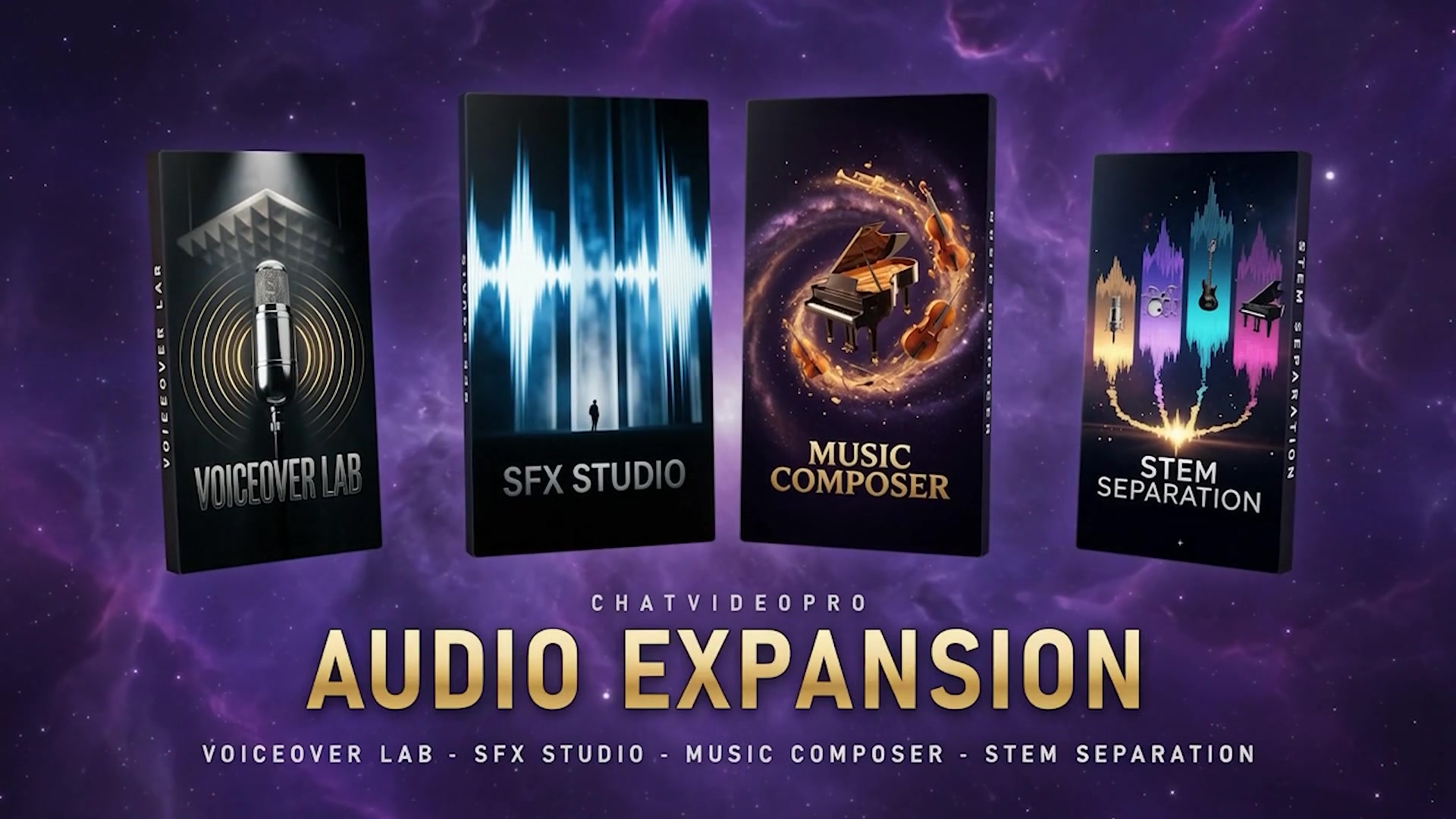
Voiceover Lab, SFX Studio, Music Composer, and Stem Separation are in Audio Expansion. It is included in Creator Bundle and active Creator Pass, or sold as an add-on.
Yes, in every version. It is part of the panel, not an add-on you buy separately.
No. Picking a preset and styling it yourself costs nothing extra. The optional AI pass shows its price before it runs, and you never need it.
They export as one transparent video clip, placed in sync on your timeline. It is not a MOGRT, so your timeline stays smooth.
Yes. Fix it in the panel and export again. Only the captions that changed are re-rendered.
Yes. Export SRT, VTT, or a native Premiere caption track. These carry no styling.
Story Scribe, with word-level timing in 99+ languages. Or import Premiere's own transcript at no cost.
Styled captions work in English, Spanish, French, German, Portuguese, Italian, Dutch, Swedish, Norwegian, Danish, Finnish and Indonesian. Plain SRT, VTT and Premiere caption exports work in every language Story Scribe transcribes.
Yes. Save your own presets and star one as your default, so every video starts in your style.
Chat Video Pro
$24.99/mo